
If you’re searching for the ultimate camera experience on a flagship phone this year, the Galaxy S25 Edge probably caught your eye. You want sharp detail, flawless night shots, and effortless video—all in a stylish, slim package. In this review, I’ll break down where the S25 Edge camera shines and where it comes up short, so you can decide if it really tops the camera charts in 2025.
What Matters Most in a 2025 Flagship Camera?
The best smartphones in 2025 don’t just snap pretty pictures. They’re expected to perform in every lighting situation, capture distant details, and make anyone look good for social media. Buyers compare new models against heavy-hitters like the Galaxy S25 Ultra, iPhone 16 Pro, and Pixel 9 Pro. These phones set the bar high with big sensors, clever AI, and versatile lenses.
Industry Standards: Zoom, Night Mode, and AI Features
Flagship phones today offer more than just megapixels. Here’s what’s expected:
- Telephoto or periscope zoom lenses for crisp shots from a distance.
- Large, high-resolution sensors for sharpness and detail.
- Advanced night and AI modes that brighten low-light scenes and fix tricky exposures.
- Pro-level video options with features like Cinematic Mode on iPhone or Google’s Magic Editor.
- Powerful computational photography to balance exposure, reduce noise, and intelligently sharpen images.
For a sense of the competition, check out this roundup of the best camera phones in 2025.
Where Does Samsung’s S25 Edge Fit In?
Samsung gives the S25 Edge a luxury design: it’s thinner, more elegant, and easier to hold than the Ultra. But unlike the S25 Ultra, it skips the telephoto lens. Instead, you get a top-tier 200MP main camera and a strong ultrawide, matching the Galaxy S25 and S25 Plus lineup. Compared to the iPhone 16 Pro or Pixel 9 Pro, the S25 Edge prioritizes style and slimness over raw lens variety.
S25 Edge Camera in Real Life: Strengths, Weaknesses, and Sample Scenarios
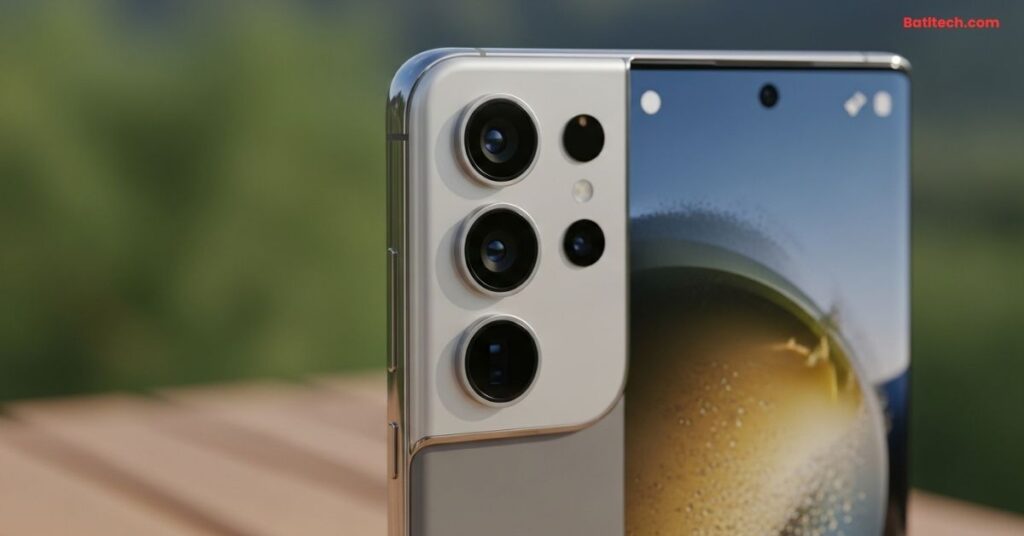
To see how the S25 Edge performs for real users, I’ve gathered insights from top reviews like Android Central’s hands-on analysis and technical breakdowns from GSMArena. Here’s what stands out, what misses the mark, and who will enjoy this camera most.
Main Camera and Image Quality: High-Res, Day and Night Performance
The S25 Edge uses Samsung’s 200MP ISOCELL main sensor, just like the Ultra. This means:
- Outstanding sharpness in daylight: Details look crisp, even when you zoom in.
- Wide dynamic range: Bright skies and dark shadows come through evenly.
- Low-light improvement: Night shots are bright and colorful with limited noise thanks to Galaxy AI.
- Fast autofocus: The phone locks onto subjects quickly, which helps with moving kids or pets.
AI processing smooths out harsh light, corrects color, and sharpens faces. Some users find the images slightly more “processed” than the iPhone 16 Pro’s natural look, but the photos are always eye-catching.
Wide Angle & Front Camera: Versatility and Social Media Readiness
The 12MP ultrawide lens makes it easy to capture landscapes or big group shots. It’s sharpest in the center, with some blurring at the edges, but remains reliable for travel and events. The front camera delivers bright, detailed selfies and clear video calls.
- Face detection softens skin naturally.
- Auto-HDR keeps backgrounds from blowing out.
- Wide-angle selfies fit everyone in the frame for group photos or vlogs.
Whether you’re posting on Instagram or chatting on Zoom, the S25 Edge’s secondary cameras rarely disappoint.
Zoom and Missing Telephoto: What Are the Real-World Limits?
No dedicated zoom lens means digital zoom takes over after 2x. You can pinch in to 10x, but detail drops quickly beyond 3–4x. For everyday snapshots and city scenes, this won’t bother most users. However, if you want to photograph wildlife, concerts, or distant landmarks, the S25 Ultra’s periscope zoom or even the Pixel 9 Pro offers much better reach.
Key takeaway: The S25 Edge is fantastic for most photos, but not for serious zoom lovers.
Video Capabilities: 8K and 4K Footage in Your Pocket
Video is another strong point for the S25 Edge:
- 8K recording at 30fps for ultra-sharp home movies.
- 4K video at 60fps with rock-steady stabilization.
- Slow motion and Super Steady modes for action shots.
- Accurate colors and reliable autofocus even when moving.
While the iPhone 16 Pro’s Cinematic Mode might edge out Samsung for focus transitions and the Pixel 9 Pro excels in stabilization, the S25 Edge holds its own for vlogging or family moments. Video files are sharp, colorful, and easy to share.
So, Is the S25 Edge the Smartphone Camera to Beat in 2025?
If you want the thinnest, most stylish Samsung phone with a flagship camera, the S25 Edge delivers on almost every front. Photos are sharp, vibrant, and easy to share. Night mode and AI smarts ensure good results in tough settings. The 12MP ultrawide and selfie cameras handle most daily needs well.
However, some tradeoffs are clear:
- No telephoto zoom means the S25 Edge can’t match the S25 Ultra, iPhone 16 Pro, or Xiaomi 15 Ultra for distance shots.
- Slightly more image processing than the Pixel 9 Pro or iPhone.
- Best for casual users who want great all-around performance but don’t need the full toolkit of a pro camera phone.
For dedicated mobile photographers or anyone who loves zoom, the Ultra or a rival flagship is a better fit. For social media, travel, and family photos, the S25 Edge is a stylish and highly capable choice.
Conclusion
The Galaxy S25 Edge impresses with its main camera, powerful AI, and striking design. It’s easy to use, reliable for daily shots, and ready for any moment. Still, if you need top-end zoom or the most natural color, look at the Ultra or a competitor. For most users, though, the S25 Edge offers a fun, easy, and stylish way to capture life in 2025.
Disclaimer: This review provides general information and draws from reputable sources at the time of writing. Individual experiences may vary. For warranty concerns or technical troubleshooting, consult Samsung or a trusted technician.
Read also.